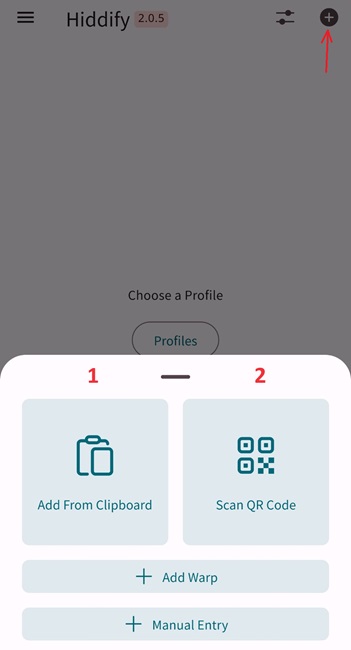
1. Install SimurghVpn app on your device (Hiddify)
2. Pay selected vpn plan , recive your vpn connection link from our support
Add your vpn link/QR code to Hiddify app

Buy your private vpn account with Credit Card, PayPal, or Crypto . Available for Windows, iOS, Android, Mac, linux, openwrt Router, Smart TV.
Get access to all platforms with fixed IP for a flat monthly fee
500 GB Network Traffic
5G Bandwith (10Gbps)
Static IP - Cloudflare protection
Available Locations 🇩🇪 🇧🇬 🇦🇲 🇳🇱 🇵🇱
All Platforms
3 Days Money Back Guarantee
Get access to all platforms with fixed IP for a flat bimonthly fee
1000 GB Network Traffic
5G Bandwith (10Gbps)
Static IP - Cloudflare protection
Available Locations 🇩🇪 🇧🇬 🇦🇲 🇳🇱 🇵🇱
All Platforms
5 Days Money Back Guarantee
Get access to all platforms with fixed IP for a flat quarterly basis
1500 GB Network Traffic
5G Bandwith (10Gbps)
Static IP - Cloudflare protection
Available Locations 🇩🇪 🇧🇬 🇦🇲 🇳🇱 🇵🇱
All Platforms
7 Days Money Back Guarantee
Get access to all platforms with fixed IP for a flat semiannual basis
3000 GB Network Traffic
5G Bandwith (20Gbps)
Static IP - Cloudflare protection
Available Locations 🇩🇪 🇧🇬 🇦🇲 🇳🇱 🇵🇱
All Platforms
10 Days Money Back Guarantee
Get access to all platforms with fixed IP for a flat annual basis
5000 GB Network Traffic
5G Bandwith (20Gbps)
Static IP - Cloudflare protection
Available Locations 🇩🇪 🇧🇬 🇦🇲 🇳🇱 🇵🇱
All Platforms
12 Days Money Back Guarantee
Get access to all platforms with fixed IP for a flat biennial basis
10000 GB Network Traffic
5G Bandwith (20Gbps)
Static IP - Cloudflare protection
Available Locations 🇩🇪 🇧🇬 🇦🇲 🇳🇱 🇵🇱
All Platforms
15 Days Money Back Guarantee
After complete your purchesing, copy your SimurghVPN subscription link, click on + on right top Hiddify app, either click add from clipboard wait until your profil is loadinig to the app, then click blue circle. Or scan your SimurghVPN subscription QRcode by device camera wait until your profil is loadinig on app then click blue circle
Whenever switch the internet or being disconnected, click on 🔄 left on your account box in order to update profile & receive new proxies from server according to your internet network